Why I built Quick Text Copier
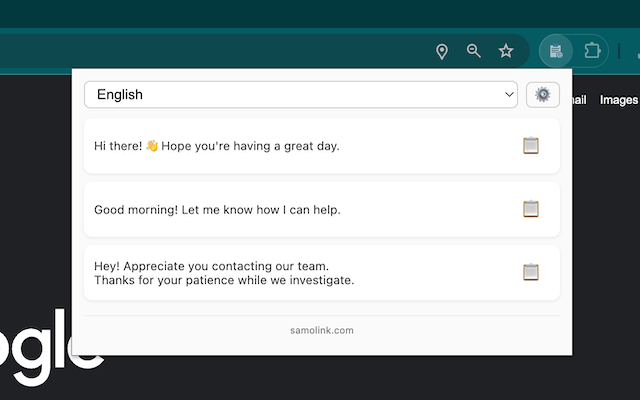
In support and sales follow-ups, I kept retyping the same greetings and closes. Quick Text Copier turns those into one-click snippets, grouped by category, without opening a heavy notes app.
The rule: keep it simple, grouped, and distraction-free. Configure categories once, click to copy in the popup, and never edit inside the popup so you don’t accidentally change the source text.
📥 Installation
Get the extension from the Chrome Web Store:
👉 Install from Chrome Web Store
How I set it up
-
Set categories and text
In the options page I add categories like “Greeting”, “Closing”, “Troubleshoot”, each with a few snippets. -
One-click copy
Click the extension icon, see buttons by category, single-click to copy. No confirm dialogs, no in-popup editing. -
My go-to snippets
- Greeting: “Hi {{name}}, thanks for reaching out—here’s a quick summary…”
- Closing: “If anything’s unclear, ping me here and I’ll get back in <30 mins.”
- Troubleshoot: “Please send the console screenshot (
Cmd+Opt+I→ Console tab) and the last 5 actions.”
Tips from daily use
- Keep 6–10 high-frequency snippets so you don’t scroll forever.
- Wrap variables in
{{ }}and swap them after pasting—fewer mis-sends. - If you care about privacy, sync your config to your own cloud or private repo; the extension doesn’t upload content.
Who finds it handy
- Support/CS: greetings, apologies, closes
- Sales/follow-ups: booking, confirmation, reminder templates
- Dev/Ops: repro steps and log-request prompts
Enjoy!